The Wrath of Kon

Dispatches, thoughts, and miscellanea from writer Jon Konrath

Tag: apple

iOS 4.1, semi-portable computing

iOS 4.1 came out yesterday, and I updated my iPhone 3G, which has been plagued with slowdowns and randomness since I updated it to 4.0.  It was almost so bad that I thought I was running a high-end Windows Mobile phone.  (Okay, not that bad.)  But it appears that the fixes in 4.1 alleviate any of the problems I was having, and everything is back to normal.  I can’t use the new game service, and it doesn’t multitask, both of which are not deal-breakers for me, since I need fewer things to waste time with, and I don’t care much about multitasking as long as I can switch between apps smoothly.  (Like for example, my Windows Mobile phone multitasked, but switching between applications was clunky and involved the virtual equivalent of the phone saying “oh yeah, hang on a second dude…” Switching between email and the web browser is faster on the iPhone, even if both of the applications are running and in memory in WM, the only difference being that in WM, you’re burning through the battery twice as fast.  And I used to constantly do stuff like switch out of Google Maps but not exit it, so it would still be running but not be visible, and by lunch my battery was dead.)

One of the things that enticed me though, and I can’t find any good information on it, is that you can supposedly use a bluetooth keyboard now with the iPhone.  I don’t know if you can on the 3G, or if the performance is decent, but if so, that gets me a step closer to the ideal travel computer setup.  I’ve always wanted some kind of thing where you had an iPhone-sized palm-based computer that you could pull out of your pocket to take a picture or play a song or jot down a note, but then when you sat down at a desk, you could pop it in a cradle or stand and hook up a keyboard and maybe a monitor, and you’d be able to work.

I think my obsession with this model was fueled by a week I spent in San Diego for a conference in 2000, when I only had my Palm Pilot IIIx with me.  It was before I owned a laptop, and probably the main reason I shelled out $5000 for a Dell Latitude in the beginning of 2001.  But this was when the Palm was a big deal, and every suit you see tooling around the airport with an iPad today was tooling around the airport with a Palm Pilot back in 2000.  You could actually go to a CompUSA and buy software for the Palm Pilot - actual shrinkwrapped, boxed, on-disk software.  I think back then, they had entire aisles of software, plus all of the cases, screen protectors, cables, docks, and other add-ons you could buy.  I did a lot of reading on the Palm, a lot of eBooks (which was ten years before the eBook was invented, according to current news reports).  I also played many, many rounds of Dope Wars, and found many hits of acid on a dead dude in the subway, when I happened to actually be on the subway.  But I never really wrote much on the Palm, because the stylus and the graffiti inking language never completely jived with me.  I can barely read my own handwriting, so learning a new handwriting system was out of the question.
p5180020

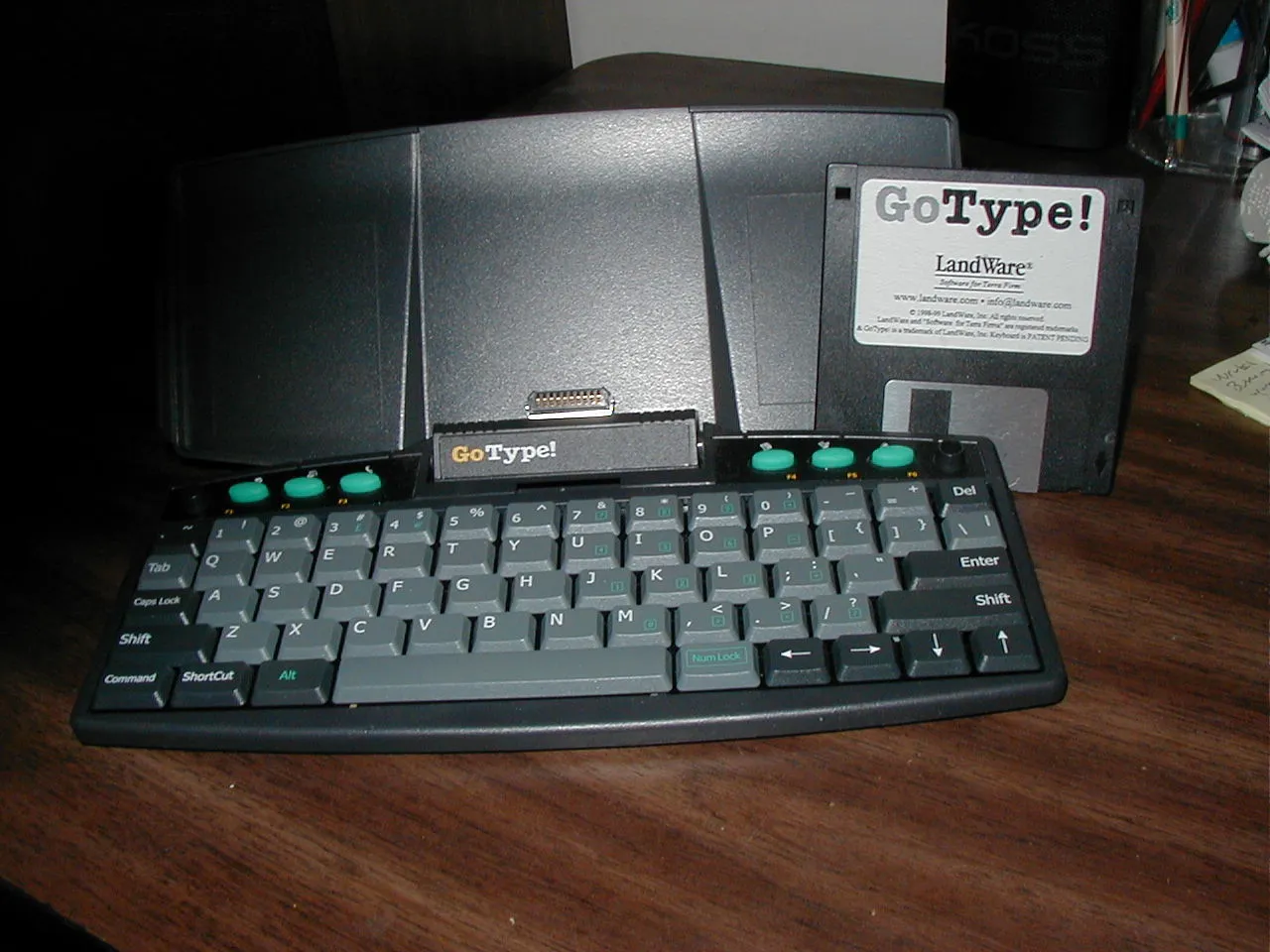
I did no writing on the trip - I found a Borders instead and bought an armful of Philip K. Dick books to keep me busy.  But when I got home, I saw this little keyboard at CompUSA and immediately bought it.  The thing unfolded and you plugged your Palm Pilot into the lid, sort of like a makeshift cradle, and then typed away.  This thing was an awesome novelty for me for about three days, until I got bored of trying to write on the Palm Pilot and decided to start gardening in my kitchen or trying to collect crossbow parts off of eBay or whatever the hell else I did at that point in 2000.  This keyboard looked neat, and the folding lid was nifty, but the keys were like 95% sized, and my fat fingers kept hitting the wrong things.  Plus there was some weird delay of a tenth of a microsecond that made the user experience a bit sloppy.  And there were various ergonomic issues with having the keyboard immediately under a three inch screen, and the joined assembly bouncing around as you typed, unless you had a perfectly flat and stable surface to rest the whole thing on.

So would a bluetooth keyboard and an iPhone solve any of these problems?  I’m guessing you would have the same ergo issues unless you pumped the iPhone video into a big monitor.  And it’s not like I can run emacs on my phone, so I’m not going to be writing a 300,000 word book in the notes application.  Also, there’s the issue that the 3G is not a powerhorse cpu-wise, so even my lowly netbook is going to outpace it for desktop application performance.  And then I have the various sync issues; I can’t keep all of my writing on my home computer in a phone’s tiny flash memory.  I suppose I could concoct some scheme where all of my data lived in the cloud somewhere, but that doesn’t help me much at 40,000 feet with no cell tower in sight.  (Side note: man, I hate the term “in the cloud”.  It reeks of MBAism, something that was invented by a suit to describe a long-existing service and wrap it up in some hip and smarmy term that could be resold for more money. I mean, was my VAXNotes conference back in 1989 “in the cloud”? )

Maybe the iPad is part of that solution - you have a big screen, you can haul it around easy, you can plug in that keyboard cradle thing or pair up a bluetooth keyboard and write.  And everything I write here, even though it isn’t my primary writing repository, lives in a remote server and can be accessed by any machine with a reasonable web browser and a functional connection to the internet.  Wordpress has a halfway decent app on the iPhone, and if the iPhone glass keyboard wasn’t so slow for me, I could write on there.  (It works perfectly fine for web surfing, googling things, and the occasional two-sentence email message, but I can’t hack out a thousand words on it unless you gave me like eight hours and four Ativan tablets.)  All of this is much less important starting next week when my office is my home and my Mac is always within arm’s reach.  But it might be more important the first time I have to make a trip back east for work.

Speaking of, last day of the old job is today.  I thought about writing something giant and grand to sum up my feelings about that whole situation, but it’s complicated, so maybe later.  Probably not tomorrow though, given what happened nine years ago and all.

There are no coincidences

The last time I bought a new computer, the Rockies beat the Mets.  Today, the Rockies beat the Mets.  And guess what I did?  No, I did not buy a computer because Denver beat New York.  (If that was true, I’d own many computers.)  But I did replace my 2007 MacBook.

I ordered the new MacBook Pro, which was announced yesterday.  I got the 15-inch version, with the 2.66 GHz  Intel Core i7.  This is the latest and greatest chip, which is a dual core, but is also hyperthreaded, so it’s more like a quad-core, sort of.  And it has this new turboboost technology, so as long as you are not running hot, the system will overclock one or both cores up to 3.33 Ghz as needed.  It also has both integrated graphics plus an NVIDIA GPU, and can intelligently switch between the two on the fly, which is new in this model.  It also has a nine-hour battery, and the unibody aluminum case.

I did not spec up at all, so it comes with the stock half-terabyte 5400RPM drive and 4 GB of RAM.  I also didn’t opt up for the new higher-res screen, or preinstall any optional software.  I think I’m taking a big enough bump up in performance that I’ll be happy with what I get.

And because I was impatient, I went to the Apple Store at lunch to see if they actually had them in stock, and they did, so I cancelled my order online and picked one.   And now the cruelty any new computer purchase:  I have spent the last four hours with both new and old machines tethered together, slowly copying the last three years of my life through a cable and onto the new machine.  And it does not look like it will finish by bedtime here, so I will have to play more tomorrow.

For those keeping score at home, that brings our household to two MacBook Pros, a MacBook, two iPhones, two iPods, and an AirPort Express.  No iPad.  I didn’t even get to check them out, I was in such a hurry to get in and out of the Palo Alto Apple Store.  I saw one out of the corner of my eye, and it looked neato, but I think Apple has taken enough of my money for a bit.

So I guess it’s a good thing I have this journal on WordPress now; I can type away from my Samsung netbook while sitting in bed.  I’d write a bit, but all of my writing is locked away on the Mac(s) until the transfer is complete.  At least six hours of copying is better than six days of waiting on FedEx.  Right?

BTW I don’t know how it happened, but I went from 10th place to 3rd place in my fantasy baseball league in a matter of days.  I don’t think this will last long-term though, given that I don’t have a closer, I have two catchers in my active lineup, neither one getting more than like 35% of their respective teams’ starts, and my team’s batting average is just over the Mendoza line.  Still, they’re doing better than a few real teams out there right now.

Requiem for an iPhone

Well, my must-last-two-years-according-to-AT&T iPhone 3G just crossed the magical Apple rainbow at nine months.  It was working fine, but it started developing a crack in the back case, just above the dock connector.  It probably could have lasted another year, but I figured I would make the trek to the Apple Store and see if they would swap it for a new one, even if I didn’t have AppleCare, and they did.

First, if we’re in a recession, it sure didn’t look like it in the Bay Street Apple store.  They were wall-to-wall with people grabbing Apple gear for the holidays.  I’m curious what their actual numbers are for sales in the holiday season, and also curious if these new Microsoft stores are doing anything comparable.  Anyway, I made an appointment for the genius bar, and managed to get in at exactly the specified time.  And the swap was no hassle.  Thanks to the whole iTunes-centric backup recovery paradigm and the fact that I backed up right before leaving, the whole thing went almost seamlessly.  (Only exceptions: my WiFi and voicemail passwords vanished and had to be re-entered when I got home.)  I also sprung for AppleCare, just in case, and a new screen protector, which they installed for me.  (It’s pretty much impossible to put on an adhesive screen protector in a home with a long-haired cat, unless you don’t mind staring at a few stray cat hairs on your touchscreen for the rest of the protector’s life.)

What’s weird is that while the Apple genius boxed up my old phone and got ready to pitch it off to whatever Chinese landfill/salvage dumping ground old iPhones go to at the end of their lives, I felt slightly emotional about seeing it go.  Granted, I got an exact clone of the old model, and it even looks identical because it’s in the same old case, but I still felt slightly sentimental about seeing it go.  I think part of that is because this is one of the first cell phones that wasn’t just a vague utensil I occasionally used to make calls, but an actual fully-fledged computer that I used for a wide swath of applications within my somewhat-connected life.  I mean, I really used the camera; I listened to pretty much every Rockies game I could this season, and when I couldn’t listen, I followed along in the MLB app; I sent and read many an email; I used it as a real web browser, not a postage stamp approximation of a web browser; I found myself texting a lot more than I typically would; I even wrote a few blog posts on it.

I guess there’s always been this lack of a suspension of disbelief in my use of a palm-sized computer, either because it didn’t do what I wanted, or it had such clunkiness in what it did do.  Like, I used to have a couple of Palm OS non-phone devices, and while those were decent phone books and occasional game machines (mostly Dopewars), there was a big line to be drawn with all things connected, because there was no way for me to surf the web or read emails on those things.  Yes, you could attach on some giant pack the size of the actual device and sort of use it as a crappy cell phone, and maybe run an email program that barely worked, but there was a pretty hard stopping point in the usefulness of these machines, and it was clear that I would also need to carry a cell phone and a laptop to be semi-functional in the field with these.

I guess now we’re truly reaching this age where we can have a palm-sized computer that can really run apps and really do things and because of that, I feel the same kind of emotional (and somewhat stupid) bond I feel toward some of the primary computers I have in my life.  I mean, when I finally kicked to the curb my entirely obsolete PC that was my primary writing machine from 1991-2001,  I felt a bit of remorse to see that beige rectangle go to the garbage, even if it was fully useless even as a doorstop by the time it went in 2005.  There were many good memories of that thing sitting on my desktop as I chipped away at various books.  And I felt the same kind of nostalgia as that tiny black piece of plastic and glass (which probably had more CPU and memory than said PC) got sent back to the void.

And a side note, iPhone wise - I was tapping away while standing in line at Taco Bell, and curiously got a WiFi connection and didn’t know why.  Then I realized I was standing next to a Starbucks, which has an AT&T hotspot, and at some point I logged in at a different Starbucks, and the new magical AT&T hotspot connector mojo worked without interaction.  That sure beats the old days of having to enter a thousand characters of login info, including a password you can never use or remember.

New iPod

I bought a new iPod yesterday, to replace the second-gen 20 Gig one that I’ve had for a few years now. The battery was starting to go, and it’s on the second battery, plus I wanted more space and all of the new features, so I went to the Apple store and ponied up the plastic for the new one. They are really starting to nickel and dime you, though; I had to pay an extra $39 for a dock, and it didn’t come with a cable. I also had to pay $39 more dollars for a cabled remote. You’d think at least one of those two would be included on the highest-end model, but then you’d think people would want a model that held more than 100 songs, and I guess nobody does.

I was pleasantly surprised to find that iTunes (at least on the Mac) properly behaves when given a new iPod. I assumed that there was a direct iTunes to iPod relationship, and I would go through sheer hell getting all of the old tunes onto the new guy. But it turns out that there is a profile for each iPod, and the profile does the library to iPod mapping. So I could have one iPod only sync a subset of my library, or something weird like that, and it’s no problem. My old iPod will go to the Konrath Museum of Old Technical Devices, to be forgotten about for a decade or two, until people are like “What’s an iPod?”. Or something.

The new color iPod display is incredible! I have not messed with the photo features, which are kind of useless to me. (The iPod “Photo” model was rolled into all of the models as of the last rev.) But the screen is incredibly readable, very crisp and smooth. It’s also nice to see a few new features in the BIOS (or is it OS? whatever.) You can enable and disable the items shown on the menu, so I can finally make that stupid podcast link go away.

One of the coolest non-features is that a little thumbnail icon of an album is shown when you are playing a song. The JPEGs are put into the MP3 tags by iTunes, sort of. The pain in the ass is, there isn’t a “go find every single album cover” button or script. The closest I’ve found is that Konfabulator has an “iTunes buddy” that shows the album cover in a little widget. It hunts all of the Amazon sites and finds the image for you, and then shoots it into iTunes, which then gets it into the MP3s and onto your iPod. But this would only really work if I sat and listened to every single song in my playlist to get the tags fixed up, and that would take about 7 years. If you know of any other solution for this, let me know.

I’ve been pulling albums to add albums and stay under 20 gigs for about a year now, so it sure is nice having about 2.5 times as much space to add more stuff. (You don’t really get 60 gigs; it’s more like 55 after formatting and that crap.) I’m now on a mad rampage to rip all of the b-string CDs that I previously didn’t add to iTunes. Because I’m in the middle of moving, I have a third of my CDs in the new place and the rest back in Astoria. I think most of this weekend will involve shuffling CDs around. And I’ve decided that the days of having CDs out on shelves and racks is over. With most of my stuff being retired to “backup” status, I am planning to pack away things in corrugated plastic boxes. Each box holds a hundred discs, and those will go on a shelf or in a closet or something. I don’t really feel a need to have my house look like the back storage room of a store in the mall. My DVDs are now put in binders, which massively saved space. (About 99% of a packaged DVD is air.) And the CDs will now be hidden. The books - that’s still a big issue.

I have been at war with IKEA over trying to get a new desk. I ordered a $100 desk about three weeks ago, and they sent a vague response basically saying “don’t call us, we’ll call you.” Today, they responded, saying that shipping would be… another $100 bucks, plus about $40 of tax. (And to be fair, Sarah handled war-dialing them and trying to keep track of the order, so most of the credit for dealing with these idiots goes to her.) I just ordered another desk from Staples. Maybe I’ll get that by the end of the year. I’m currently working off of a small folding card table that sort of freaks me out, because it’s the type with legs coming out of the middle, and it sometimes makes a little creak and changes height by a couple of millimeters. I have fears of the Mac and giant monitor falling to the floor when I get up to move my chair or something. It’s a brand new table, and very nice for the occasional dinner party, but I don’t think it’s suited for all of my computer gear.

Oh, I now have three pair of those white iPod headphones, and I don’t use any of them. I guess I could “look cool” and/or get targeted by thieves, but I really hate those in-ear things. I’d sell them on eBay, except anyone can buy them new for $12 or something. Oh well.

Making the Mac switch

This is my first entry from my new machine, which is a Mac Mini. I already wrote about the big switch over on LiveJournal, so read there for the political puling. I’m mostly concerned with getting everything over to the new machine and working. I think web updates are fine, I’m reading mail here, and I’ve got the music collection into iTunes, so that’s good. I still have a lot of adjusting to my workflow, but it’s working well so far. For example, instead of having a bunch of directories with photos flung into them and some half-ass scripts generating galleries, I’m moving everything over to iPhoto. That will make things prettier and easier to deal with, but it’s still a lot of work.

I think the next project might be a print book of the glossary. I am reading this book on the history of Apple computer, and it’s similar in a folklore sense, plus it’s that 8-inch square format that lulu just added to their roster, and I’d really like to do a book like that. I know absolutely nobody will buy a copy, but I mostly want one for myself. So I’ve been picking at the entries a bit. Some will go away - Ray is still convinced I wrote the entire project just to spite him, and so I will have to trim a few things. I also have a lot of ideas for new entries, and those are percolating. I now generally dislike the ones about people and like the ones more about concepts, or old stores or restaurants or whatever that have vanished. Lots of work ahead, I guess. Take a look at the site - I am making edits and syncing them to the head, so to speak, so they are all viewable. I’m also nervous I horridly fucked some pages when I moved the computer, so if you see anything weird, let me know.

OK, back to playing with iPhoto…