The Wrath of Kon

Dispatches, thoughts, and miscellanea from writer Jon Konrath

Tag: obsolete-technology

Three and three quarter inch memories

So I had to go to storage the other day, to put away the box from my new bass, because if I just threw it in the recycling bin, the truss rod inside the bass neck would have exploded and I would have needed to mail the thing to Germany or Uganda or something for warranty repairs, and I’m pretty sure finding a cardboard box the size of a bass would be a month-long venture.  I didn’t want to dig through the unit, although I think I can now shred any files older than 2007, and there are boxes of tax papers going back to 2000 in there, but they’re in the very back of the unit, and that would involve unpacking everything to pull those boxes, so that can be left for some other time.

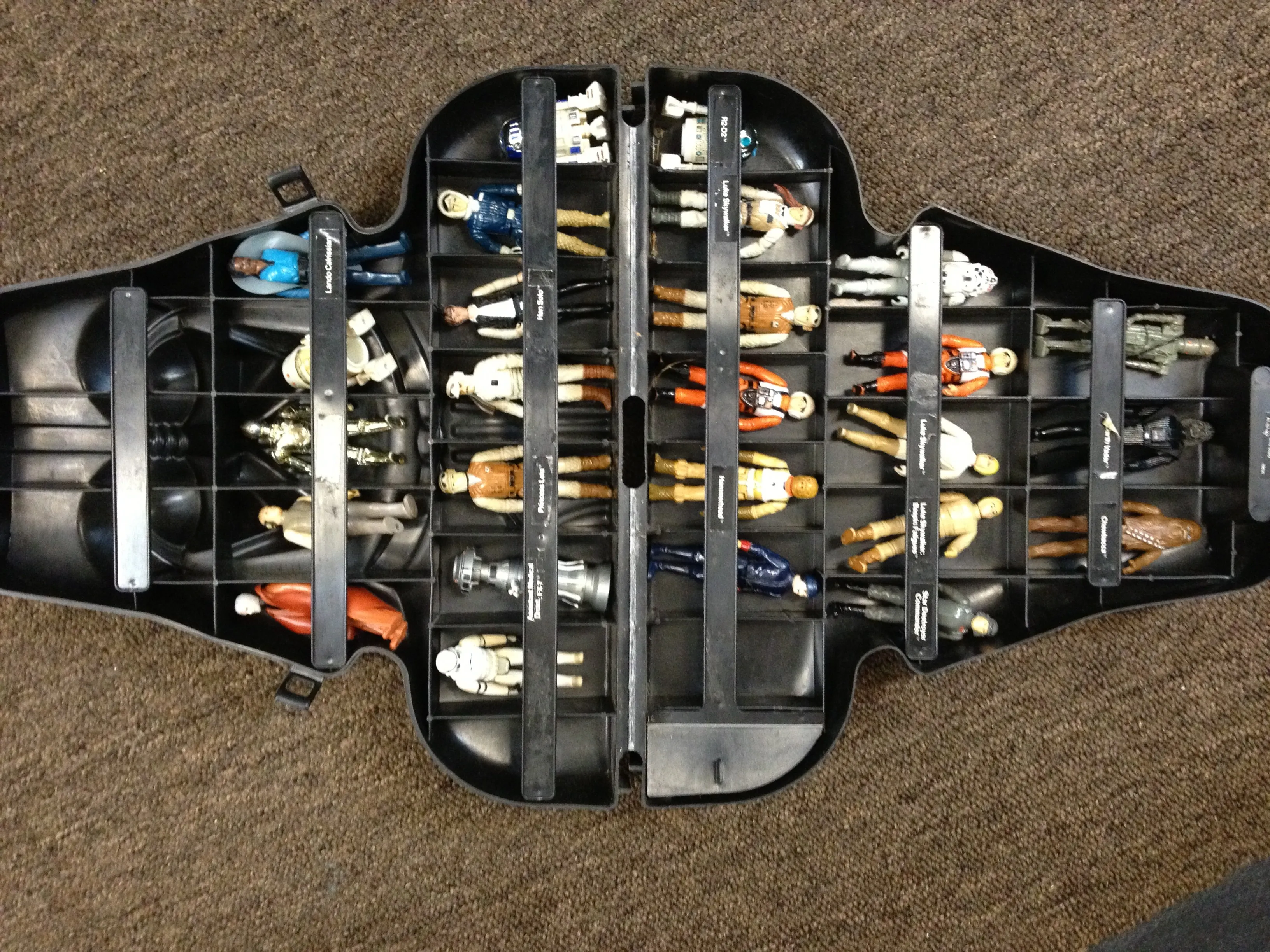
What I did find though, is something that I thought was lost: a good chunk of my Star Wars action figures from the late 70s/early 80s.

Check this out:
IMG_0940-e1357859604600

When I was a kid, Star Wars figures and Legos were the father, son, and holy spirit of my life.  I probably spent an entire year of my life in the toy aisle of K-Mart, memorizing the back cards of every action figure hanging from the displays, digging through every unit hanging from the metal pegs in hopes that some rare figure would be hidden in the very back.  (For example, at one point, the light sabers that extended from the arms of Luke, Obi-Wan, and Darth Vader were two-piece telescoping units; these were later replaced with solid one-piece units that didn’t extend as far.  All of my figures came with the later one-piece light sabers, but I was convinced that if I dug around enough, I would miraculously find a two-piece lightsabered figure at the store, which I of course never did.)

Various thoughts about these figures, in no particular order:

  • This isn’t my entire collection; I don’t know what happened to all of the rest of them.  Notably missing are my original R2-D2, Yoda, and Boba Fett.  Also missing are all of the guns and accessories, which are supposed to go in that little compartment with a door.
  • I also used to have a set of accessories that you got for mailing in a bunch of proofs of purchase, which included vinyl plastic astronaut-type life support backpacks, gas masks, and a backpack that would hold Yoda on Luke’s back.
  • I found this, coincidentally, on the same day I read in David S. Atkinson’s book Bones Buried in the Dirt about a similar Darth Vader case.
  • All of the figures I have with capes (Lando, Obi-wan, Vader) all have plastic capes.  Some of the first-generation characters had cloth capes, which I believe are much more rare.
  • The most predictable comment one would make while looking at this would be “oh man, imagine how much those would be worth in their packages.”
  • I had at least two Boba Fett figures.  They were also a mail-away, and I had enough points to get more than one.  The Boba Fett is best known for having a fixed missile on his back, which was supposed to be a spring-loaded firing missile, but some kid, who may or may not have been Mikey from the Life cereal commercial and/or eating Pop Rocks at the same time, fired the missile down his throat and died.  (That’s not what happened.)  Almost everyone I know who collected Star Wars figures as a kid claims they had one of the rocket-firing Boba Fetts.  They are all liars.  They never released one, although in 2010 they finally did.  (I guess kids are too obese to choke on rockets now.)
  • The original Han Solo figure I have has lost most of his hair-paint.  That’s because after Empire, I used to freeze him.  Lacking a carbonite chamber, I’d put him in a glass of water and put that in the freezer.  This would result in a Han Solo frozen in a round chunk of clear ice, but whatever.  This was before the internet, so my entertainment options were limited.
  • One of my Hoth Rebel soldiers has a weird looking head.  That’s because someone in my school broke the original head off.  My dad tapped a set of threads in the head and neck, and sunk a small allen-head bolt in there so the original head screwed back on.  This made the figure much cooler, as I could unscrew the head, leaving a bolt sticking out of the neck like a robotic spine.
  • My Chewbacca had a weird divot missing from the top of his head, right at the seam.  It looks like he was into self-trepannation.
  • The R5-D4 figure has only white, worn-off remnants of its original sticker.  After this happened, when I got the R2-D2 figure, I painted over the sticker with clear nail polish of my mom’s.  This preserved the label, but now it’s got this weird yellowish sheen to it.
  • Speaking of discoloration, my Hoth Han Solo appears to have jaundice from a bad case of hepatitis.
  • My favorite figures include the Hoth Luke Skywaker, the R2D2 with the extending antenna in his head, and the missing Boba Fett.
  • The figures that now seem stupid include Bossk and Lobot (who had a combined total of about 3 seconds of screen time), the Bespin Guard (who looks like a creepy guy with a waxed mustache and beret you’d find hanging out at a leather bar) and the FX-7 robot (which did not have moving legs, could not sit and therefore didn’t fit in any vehicles, and came with no guns or accessories.)

Amazingly, all of these survived.  My GI Joes did not - for whatever reason, they were much more susceptible to damage.  One of them lost both of his thumbs because he had this bazooka that essentially worked as a large lever to fatigue and break the little plastic digits.  So I chopped off his hands, touched up the stumps with red paint, and he became “Can’t Read Text on a Claymore Mine Joe.”  When that got boring, I hit him with some aqua-net and a cig lighter, and he briefly became “Victim of a Friendly Fire Napalm Incident Joe” and then “Cannot Identify Remains Joe.”
What happened to hypercard?

Hypercard was released 25 damn years ago.  Has it been that long?

Back in college, I spent a lot of time screwing around on the Mac, and there were certain programs that welded that old-school 68K Classic Mac experience in my mind.  One of them was Aldus PageMaker, which was the desktop publishing program of the day. This was in the very early 90s, in the days of DOS and WordPerfect 5.1, when the most advanced publishing work you could do on the WinTel side of things was using italics.  But the Mac had this funky and advanced program that enabled you to create page layouts and cool newsletters and even newspapers.  I saw many a journalism student slaving away on those old black-and-white Apples with the tiny grey screens, tweaking layouts and dumping fantastic publications to postscript printers.  I later learned PageMaker by doing the last issue of my old zine Xenocide in it, spending months tweaking page borders and reflowing columns.

The other program I messed with endlessly was HyperCard.  This was something included on all of the old Macs, and it was incredibly interesting to me.  Basically, you created a stack of cards, and each card could have a mix of text and clip art graphics on it.  But you could also plop controls on the cards, like links or text boxes.  You could then hook up those controls to link cards to each other, or do other freaky stuff like run scripts.

This sounds pretty pedestrian compared to what we do daily on the web.  And it sounds disturbingly like PowerPoint, which is probably one of the most evil things created in the business world. But back then, in the late 80s and early 90s, these concepts were absolutely revolutionary.  And even better, the interface to HyperCard was not that intimidating.  If you could make basic art in MacPaint or write a paper in WordPerfect, you could easily create a HyperCard stack.

I remember spending a lot of time at work creating a choose-your-own-adventure game using HyperCard.  I forget exactly what it was - I think it was a game about trying to score drugs on a college campus, and you could click on various pictures to move around.  It wasn’t exactly as sophisticated as the Zork series, but it was something I could do at work, under the guise of “learning more about HyperCard.”  I never learned much about the scripting language, but I did work with some people who did pretty sophisticated stacks.  The system was widely used by education majors, I guess to develop learning tools for kids.  I guess the original Myst on the Mac was written in Hypercard, each of the worlds a Hypercard stack, interlaced with heavy-duty graphics and audio, presented with custom plug-ins.

Like I said, the web came along, and HyperCard more or less vanished.  It was one of the products developed by Claris, which was spun off from Apple and then later re-merged.  The last version of HyperCard came out in 1996, but it was one of the projects killed by Steve Jobs after his return.  You could run old versions for a while, but it did not survive the jump from OS9 to OSX.  You could get it to work in Classic emulation on newer systems, but it only worked on PPC Macs.  On today’s Intel-based machines running later versions of OSX, it doesn’t work at all.

Its one big legacy on the Mac is that the HyperTalk scripting language was adapted and added to System 7, and called AppleScript.  It’s still around in modern versions of OS X, and is even more interesting, now that you can run unix commands from within AppleScript.  It influenced the development of HTTP, JavaScript, and Ward Cunningham said the whole idea of wikis goes back to using HyperText.

To me, HyperCard was always a bit of a missed opportunity.  I think it would be very easy for casual users to create HyperCard stacks and then use some kind of tool to push them to a web site; it would potentially be easier to create high-quality interactive web sites with something like that.  There are probably many programs that you could buy to do that, but none that come with your operating system and follow its UI paradigm.  It would also be great to develop mobile apps.  I could see creating a stack, testing it out on your computer, then pushing it through a compiler and shooting out a binary that could be run on a phone or tablet.  You couldn’t write the next Skyrim that way, but for simple stuff, like interactive kid’s books or multimedia guides, it would be great.  Same thing for interactive books on the Kindle or iPad.

I know you can do all of these things with XCode or by hand or whatever, but there’s something about the ease of use by a non-programmer, and the availability on every Mac, that make this a different paradigm.  There are some conspiracy theories that Jobs killed Hypercard in order to solidify the division between creator and consumer.  I don’t know if that’s true; I think he killed it because Apple had eleventy billion disparate things going on when he returned, and none of them were getting the company closer to profitable hardware sales or a decent operating system.  It’s too bad we don’t have something like this anymore.

Calculator K-Hole

smd10882

Something I sometimes do when I don’t have time to waste but still want to lock into some useless pursuit that will eat up hours is to try and find various things I owned as a kid.  The other day, I started thinking about old calculators, and went on an endless search to find some of the ones I used in high school and college.

It’s odd to even think about a time when people used calculators.  Now, when I want to figure out if an actress is 18 yet by subtracting her date of birth from the current year, I either use the calculator app on my computer or my phone.  I also have an actual four-function solar calculator I stole from my job’s office supply closet in maybe 1996, which was useful when I used to balance my checkbook, back when I actually wrote checks and couldn’t just look the crap up on my phone.  But the calculator on my iPhone is generally easier to use, and I know where it is at any given point.

I recently had a discussion with my sister about old calculators.  When we grew up, our parents had some old TI calculator, from maybe 1975, which had a hundred buttons and a flickering red LCD display and took a giant 9-volt battery.  We had no idea what TAN or SIN meant, so we’d randomly hit the buttons, trying to get the machine to print out some cool stuff.  We also had one of those Little Professor calculators, which had a face on the front of it (which always looked like an owl to me) and would print an equation like “7 + 9” and then wait for an answer, printing EEE when you entered an incorrect answer.

Calculators weren’t allowed in school for years, because when you’re supposed to be learning how to multiply single-digit numbers, a pocket calculator was as unfair as having a multiplication table in your hand, if not worse.  And then when I got to high school, this completely reversed, and some classes required you to have a calculator.  In a physics or trig class, the ability to quickly multiply and divide was a requirement, and we were suddenly allowed to use these electronic devices.

Something I never thought about, though: I was probably the first generation to have this luxury. When I was born in 1971, the first solid-state calculators were being manufactured.  In 1965, Sharp introduced the CS-10 calculator, which weighed 55 pounds and cost $2500.  By the end of the decade, they were fitting in shirt pockets (like those big Android phones “fit” in a pocket) and cost more like $500.  When I started grade school, you could probably get a good four-function calculator for $50, but minimum wage was also something like $1.60.  Prior to my generation, the only way you could “cheat” on math was maybe writing the answers down beforehand, or using a slide rule, which was probably more difficult than just memorizing stuff.  When I started high school, did they change lesson plans to accommodate the ubiquitousness of digital calculators, or did math suck that much more before then?

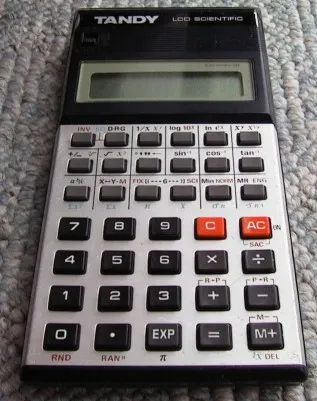
I took an electronics class in my freshman year, and we were told to buy a scientific calculator.  I don’t remember the requirements we were given, but I know it was something beyond the level of the crappy calculator you’d get for free at a Shell station with the purchase of a tank of premium.  I got a Radio Shack EC-4006, which at the time was a pretty amazing machine.  It ran on two AA batteries, and had a ten-digit display.  It could convert hex to decimal and display (some) letters on the screen, plus it handled negative numbers, trig functions, and had some amount of basic programmability.

What I remembered most about calculators back then was nobody had the same make and model.  There were dozens of different permutations of the basic calculator from TI, Casio, Radio Shack, Sharp, and lots of no-name or knockoff brands.  The cream of the crop was the HP, which were incredibly expensive and used RPN.  Someone in my class had one of these, and it looked nice, but I could never get the hang of entering all of the numbers and then entering an operator.  I also remember Ray having some high-end Radio Shack that unfolded and had the display and main keys on one side, and a set of advanced function keys in the inside lid.  Any time anybody touched it, he gave a twenty minute lecture about how you weren’t supposed to bend open the cover all the way, or it would stretch and break the microscopic conductive traces between the two halves.  (This meant that everyone would try to take his calculator when he wasn’t looking and vigorously fold open the cover as far as it would go.)  But we were all, in some sense, defined by the calculators we used and carried.  Some of us took great pride in the calculators we used, while others were ashamed of their hand-me-down crappy drugstore ripoff version that couldn’t even do exponents.

I think I kept the same calculator until my second year of college, when I replaced it with this Casio graphing calculator, the fx-7000G.  I still have that one in storage, although I don’t have batteries for it.  (It used flat watch batteries.)  That one had a 96x94 pixel screen and could be programmed in a crappy version of BASIC, although it had a whopping 422 bytes of memory.  I remember spending the Christmas of 1990 at my then-girlfriend’s parents’ place in Toledo, trying to write a chess game in BASIC on that thing, which of course was impossible, as was actually saving anything with no disk drive or printer.  My math career didn’t last much longer than that year, and I never had a good reason to carry around a graphing calculator, so I didn’t use it after that.

What’s astounding to me is how familiar the key layout of that Radio Shack calculator looks to me now.  I carried that thing around for years in my book bag, toiled away on those chicklet-style keys, and spent many a boring lecture trying to spell out 7734-derived numeric sequences that, when the display was flipped, would spell out words.  The layout of those grey and orange keys is burned into my head, and reminds me instantly of when I was hacking out story problems back in 1987.

What’s also amazing is how collectible some of the old calculators can be.  I was looking to see if I could score one of those old HP calculators on eBay, and even the most basic of the RPN scientific calculators are untouchable for under a sixty or eighty bucks.  HP, after twenty years of not releasing them, brought them back in limited editions, and you can get a brand new HP 15C for about $99.  There are scores of web sites with pictures of old eighties calculators, just like the obsolete computer museums you find online.  I don’t foresee myself doing anything more complicated than calculating interest on a loan, and it’s probably easier to use one of those online calculators for that, so I probably won’t be buying one.  But it’s neat to see that people are still into it.

The Cult of Keyboards

IMG_0080-e1326566626585

As I approach the end of my 40th year, my body is falling apart.  Okay, that may be an over-exaggeration, but every morning, it feels like another piece has been overextended or abused or mutilated, from the various discs in my back to the muscles and joints in my shoulders or arms or knees or toes or whatever.  Ever since I’ve started working from home, poor ergonomics has caused a rash of various repetitive stress injuries.  Or maybe all of the steps I’ve tried to prevent said injuries have caused it.  I don’t know.

I do know that my keyboards have been the main focus of this hell.  I mean, I also bought extensions to raise my desk, a different mount to raise my monitor, and one of those freaky bicycle seat-looking office chairs to prevent me from slouching, and that all helps.  But I think in the last decade, I’ve probably put down about a million words between work and fiction, and all of those go through my ten digits via some kind of USB-connected appliance that’s based on a design originally thrown down a hundred and a half years ago by opium-deranged business machine sadomasochists trying to find a way to keep busy women in between bouts of making sandwiches.  Never mind the fact that we don’t yet have machines that read our minds or let us simply talk to our computers like we’re Scotty whipping up a batch of god damned transparent aluminum. The fact that we still use essentially the same QWERTY design as a century ago, the one that was specifically invented to slow down typists, is a travesty to all things mechanical.

When I got to Seattle in the mid-90s, ergo-mania was happening, and I knew more people who had RSI or carpal tunnel than I knew in Indiana who thought the earth was created 3000 years ago, and that’s a lot.  Ergo was huge, and there were all of these bizarre startups running out of garages churning out short runs of chording keyboards and strange split devices and custom DVORAK layouts, not to mention all of the alternate mouse designs, like track balls and track pads and track pens and track cocks and whatever else.  And this was before the advent of USB, when this stuff became really easy to make, and before Microsoft upped the ante on RSI by inventing prolific right-click menus and then the scroll wheel, two things that have caused more arthritis of the right hand than all of the collected works of Megan Fox.

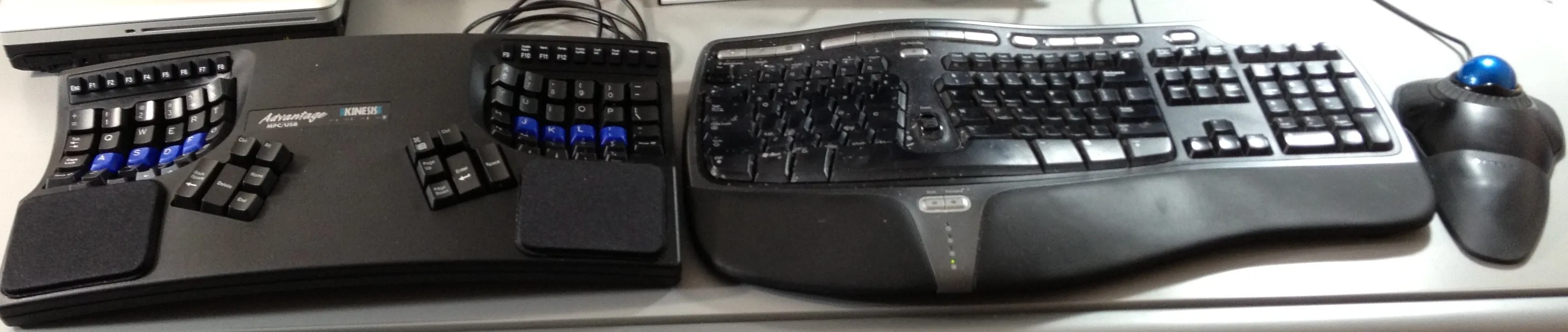
Microsoft both created and destroyed the ergo market by coming out with their own mass-produced split keyboard.  I will give credit where credit is due and say this is one product that Microsoft got mostly right.  I’ve gone through a succession of these split keyboards, most recently using the Ergo 4000, which has a large number of “media” buttons, which are nice for doing things like pausing iTunes or skipping tracks or zooming the browser window.  However, aside from the fact that I go though about one of these a year (mostly because of a combination of eating at my computer and the fact that the letters wear off almost instantly) there’s always been something slightly wrong with these peripherals.

Before the Microsoft models, I went through a series of IBM Model M keyboard clones; in fact, my first keyboard I bought in 1991 was an honest-to-god 83-key IBM keyboard from a 5-slot 5150 PC.  In 2012, there are a lot of issues with these keyboards, aside from just the total lack of ergonomic comfort; you’re not going to find a Windows key or an Apple key, and they use a cable that predates USB by at least two or three iterations.  Most of the vintage ones have also gone from the 90s computer beige to the yellow-brown color of linen in a ten-pack-a-day smoker’s house.

But the switches in these keyboards were magic.  New keyboards don’t use individual switches; they use dome switches, where the keys push this rubbery sheet that contains little bits that complete the electrical connection. The result is a quiet and cheap keyboard that feels like typing while your fingers are suspended in a bowl of mush, and at some point, the little domes will sporadically fail, and every 10,000th character you type will randomly miss, eventually causing insanity and the cost of both replacing the keyboard and the window you throw it through in a maddened rage.  The old keyboards used actual mechanical switches, each one happily clicking with a sharp tactile feel as you snapped away at the keys.  Even if you couldn’t type fast, it felt like you were typing fast.

This introduces this never-solvable paradox that seems to creep up in every damn aspect of my life.  I want an ergonomic split keyboard, that is modern and uses USB and has all of the new keys people use like Win and Alt, and has mechanical key switches.  The Microsoft ergo uses rubber dome switches, and at some point, those fail and cause madness.  It also means that even with a brand new keyboard, it feels like I’m typing underwater.  There’s a whole cult of mechanical switch keyboards, mostly from gamers who need lightning-fast key response.  Those are all standard layout, mostly because gamers only use the WASD keys.  There’s also the issue that these keyboards are all marketed to 14-year-old Asian boys, and have names like the “Viper Frag Kill 9000” and you will pay $200 for backlighting and extra buttons specifically used for Skyrim or whatever.  And outside of Microsoft, the ergo keyboard market has largely been killed.  Add to this the frustration that every single computer sold comes with a keyboard, and because the cheapest way of making them is good enough for a person who types at most 140 characters in a row, the $19 OEM POS is fine for almost everyone.

My problem with this - or with building a kitchen island, or finding the right desk, or getting a set of sliding glass doors done, or whatever the hell else, is I fall down these deep internet k-holes of endless searching and frustration.  There are several internet discussion boards full of game playing fiends touting their favorite boards.  But of course, if you posted asking for a good ergo keyboard, you’d get a thousand responses saying RSI is a myth, kind of like if you went into a random bar in Arkansas and asked the locals about global warming or evolution.  And your first 900 results in a google search are links to the Microsoft Ergo 4000.

This fall, I finally gave up and bought a Kinesis Advantage.  They are not cheap; I spent just shy of $300 for mine.  But they use actual Cherry mechanical switches, and feature a unique split system, where the bulk of the keys are in two “bowls”, and all of the modifier keys (ctrl/alt/win/apple) plus keys like the backspace, delete, enter, and space, all sit under your thumbs.  This means you can do 99% of your typing without stretching your hands out of the home position, and the keys happily clack away to confirm your speedy typing.  The Kinesis also has a complex and powerful system of keyboard remapping and macro programming in its firmware, which I will probably never use.   The one real bummer, aside from price, is that the function keys are these little rubber chicklets that will inevitably get jammed or stop working.  There’s also the issue that I am not historically a touch typist, and I had to spend a month using a touch typing tutor program (the wonderful and open-source Tipp1o) to get to the point where those ring and pinky fingers were hitting the As and Ses and Ls and ;s with regularity.

The k-hole has been reopened lately, though.  I’ve been wondering if there’s a good way to replace those damn chicklet keys.  Maybe I should get a keypad or jog-shuttle control to remap these keys.  Maybe I should get out the dremel and buy a dozen and a half loose Cherry keys and replace the switches.  Maybe I should remap the largely useless Home key so Home-1=F1;Home-2=F2, and so on.  Maybe I should stop all of this and actually write books.  Sure, right after I try to find a Kinesis macro programming FAQ online, and then hem and haw about buying a Griffin PowerMate.

Dot Matrix and Word Processors

I was writing about something completely different the other day, and went on this side diversion about dot-matrix printers, and thought about how a giant subset of the population (like everyone born after about 1985) never had to deal with them, while I spent far too many hours fighting them in computer labs, pulling apart the intricate pieces to pry loose jammed scraps of paper that got worked into the machinery.

There’s so many distinctive features of this whole era of printing that are long forgotten.  Dot matrix printers usually used eight little pins to stamp a ribbon as the print head jumped across the page.  My friend Matt had one of these, the Commodore 801, and the thing I remember most about it was that it was unidirectional; the little print head would zip across the page at a breakneck 50 characters per second, then the page would move up a line, and the head would return to the left.  But it didn’t print on the sweep back to the left, which meant it was half as fast as the expensive printers that would print on both passes.

The printers were also tractor-feed back then.  The paper had those little perforated runners hanging off of each end, little strips with holes in them, and the box of paper was fan-fold, so you could feed in the sheet and it would continuously chew through the giant thousand-page sheet of paper in a carton.  Then, after you spent 20 minutes staring at the printer, hoping the thing got through your term paper in one pass, you then had to fold and tear apart each page, then tear off the feed strips on either side.

And, of course, that never worked right.  If you didn’t line up the paper exactly, turning the little knob on the side of the printer, the end of the physical page would not match up with what the computer thought was the end of the page, and you’d get this mangled mess with a blank strip of what was supposed to be the top and bottom margins in the middle of the printed page.  The whole operation of aligning and feeding and advancing paper was a precision thing, and if the paper got folded or creased or otherwise fucked up, the printer would have no mercy and create an origami disaster out of your precious schoolwork.

The output of a dot-matrix looked like shit, and they did a lot of little tricks to get it to resemble actual type.  Like some printers had this “near letter quality” feature, where they’d do multiple passes on the same line to get a higher resolution, and they started adding more pins.  When I was at IUSB, we had armies of these Panasonic KPX-1124 printers, which had 24 pins instead of 8.  These pieces of shit were the bane of my existence back in 1991, and I spent untold hours tearing jammed paper out of these while some dumpy housewife screamed at me about her Psych 101 paper getting trashed.  (If you ever did time around one of these, watch this video and tell me if the clunking sound of that print head slamming into the left margin over and over doesn’t make you go full postal.)

It seems like everyone forgets the other bastard child of that era that made perfect typewritten letters, at the sake of glacial speeds and 120-decibel print runs.  The daisy wheel printer had a hub with a bunch of little spokes coming off of it, each one carrying a little type letter.  It could spin the wheel with a servo motor and then hammer it against the ribbon with a solenoid, making an ink impression that looked exactly like a typewritten page.  These were a big deal if you were printing out things like college admission letters, or you had an English teacher that had a hair up their ass about dot-matrix printers and wanted you to hunt down a selectric and hammer out the damn thing the old fashioned way.  Daisy wheel printers were louder than fuck, and a low-end model typically cost more than your entire computer.

But not everyone had computers.  When I was in high school, I had this “word processor” which was a glorified typewriter, except it had a single line of an LCD display, and it used a thermal print head.  It took these cartridges of some kind of crap that it could transfer to a page with a set of heated pins.  If you have one of those label maker machines, it was a similar deal, but masquerading as a desktop machine.  I think you could only type in one line at a time, and then hit return and wait a minute for it to etch onto the paper.  This wasn’t the best machine for stream-of-consciousness writing, but it was way faster than hunt-pecking on the K-Mart manual typewriter I got at a garage sale as a kid, where you’d type any faster than three characters a minute and all of the little hammers would get wrapped around each other and jam.

I somehow lucked into finding this girl in my freshman year of college that thought I was some kind of writing genius, and got her to type my papers for a semester.  I guess that sounds sort of chauvinistic, but that’s an arrangement that I feel sorry the current generation won’t find themselves in.  The “can you help me type my W131 paper?” pickup line has gone the way of the dodo.

After I wasn’t able to fully seal that deal, I dated someone who bought one of those Brother word processors, which were a very brief halfway-house between a typewriter and a computer.  It was this huge microwave oven-sized thing that was a fusion of a printer, a tiny CRT monitor, a keyboard, and the Notepad.exe program in ROM.  You could type a few pages at a time and then save them to a floppy disk (which was totally incompatible with any other computer) and then when you got it all situated and edited, you pressed a key and it would spit out the creation on actual paper.  My roommate Kirk later had one of these beasts, and I think I remember Larry working off of one for a while.  Here is a nice video of one in action.

Now, computers are cheap as hell, something it seems that most people forget, and laser printers or nice inkjets are everywhere, and we don’t really think about stuff like this.  But I remember the smell of the fine paper dust inside of a monster line printer on campus, one of these washing machine sized beasts that would mass-print thousands of pages off of VAX computers, so long as one of us consultants hooked it up with the occasional corrugated cardboard box of 17” wide tractor feed paper, that cream and light green-lined stuff.  Every now and again, some idiot would send an ASCII-art dragon to the printer, a giant picture rendered in letters that would print banner-style across three dozen pages of paper, over the course of an hour.  (Even better, when you’re sitting in a public lab and someone in a dorm sends through a picture of a Penthouse Pet done up ASCII-style.)  That was all infinitely better than when someone would accidentally dump a binary file to the DEC LG06 in the library, and it would spit out page after page of random junk until you could get an operator in the machine room to kill the queue.

My last hurrah with dot matrix was about five years ago, when I bought a Tandy 100 off of eBay.  The guy threw in a bunch of other random crap, including a Radio Shack printer from circa 1985, with some bizarro serial cable and no chance in hell of ever working with a machine produced this century.  It went straight to the dumpster, but I probably should have videotaped it going off of a four-story building, or getting it Office Space style with a baseball bat.